
Politics Archive:
Presidential Wealth
In: Politics
24 Feb 2012I can’t see why anyone cares about this, but it’s been getting some press and visualization attention lately – so here ya go:
Here’s an out of focus chart from Time magazine (anyone know why their online graphics always suck? Cutbacks, probably.)

If you want more details, The Atlantic has a paragraph on each coupled with stately portraits:

An interactive version using Tableau:

And yes – it’s cold and rainy in DC today – and I’m a little grumpy. Or maybe it’s the thought of any kind of presidential analysis that is depressing me. Barf.
2013 Federal Budget
In: Interactive Politics Source: NYT Source: Washington Post Source: WSJ
14 Feb 2012A number of news agencies took a crack at visualizing Obama’s 2013 budget proposal. (If you want to try it yourself, a shocking amount of detailed data is available in spreadsheet form at the OMB website).
Below is the Washington Post’s version. You can click on any box to see a column chart of historical values. It would have been nice to be able to drill down further, but this is a good start:

The NYT created a beautiful animated – ummm – I’m not sure what this is. A dorling diagram? Well, it looks pretty, and it’s slightly more detailed than the WashPost version, but I think the brain processes square area better than circles.


The WSJ posted five charts, but they’re nothing special:

Why Does a Salad Cost More than a Big Mac?
In: Food Politics Source: NYT
11 Feb 2012Originally from PCRM, but I link to the NYT commentary below. Farm subsidies are a joke. Actually, almost all subsidies are a joke, now that I think about it.

The Deficit: Obama vs Bush
3 Feb 2012Ezra Klein takes a crack at comparing the cost of major policy decisions:

European Response to Crisis
1 Feb 2012Almost makes it look like they’ve done a lot:

Living in a QE World
31 Jan 2012Another problem brewing. The world is running out of places to kick the credit can. As usual, there is much insight to be gained from the discussion and comments over at Barry Ritholtz’s The Big Picture.


Graphic Enhanced State of the Union Address
In: Innovative Politics
31 Jan 2012The White House released a video of last week’s State of the Union address, with a split screen showing supporting charts, diagrams, and talking points. It’s not a brilliant model of visualization best practices by any stretch of the imagination, but it is a step in the right direction, and represents a recovery from the ridicule that Ross Perot received for using charts on the national political stage in 1992.
For further insight (on both design and economic issues), I HIGHLY RECOMMEND watching this in conjunction with Jodi Beggs critique over at Economists Do it With Models.
Red State Socialism
In: Politics
25 Jan 2012Anyone have a better idea of how to visualize this data? It feels like there should be one – but maybe sometimes a table is the right tool for the job.

The Strait of Hormuz
In: Interactive Maps Politics
23 Jan 2012This FT map illustrates just how packed things are at the Persian Gulf’s bottleneck. The designers wisely chose to allow viewers to select which layers of information they wanted to see, and also provided useful related information as popups.

Here is the map with all layers turned on – which obviously would have been a disaster without the interactive filtering.

(note: some FT features require a subscription to view)
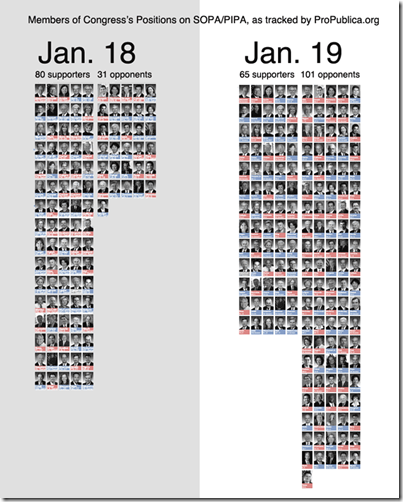
SOPA Opera
In: Politics
20 Jan 2012Democracy in action? or Congress blowing with the wind?
Ushahidi Visualization Platform
17 Jan 2012Ushahidi is a non-profit tech developer of free and open source software for collecting and real-time visualization crowd-sourced information. The project originated in a desire to map post-election violence in Kenya back in 2008 – but it has since expanded into a number of free toolsets that can be set up quickly during emergencies. To be honest, I haven’t dived too deep into this, but I wanted to post it in case others have a need.

Candidate Blind Date
11 Jan 2012Answer a series of 11 questions to see which presidential candidate’s views are most like your own. At the end, you can also roll over each candidates columns to see what their specific positions are. Personally, I thought some of the questions were slanted and missing answers that fit my beliefs – no shock, I suppose, considering they had to fit the answers to candidate platforms.

Press Freedom Map
9 Jan 2012I went to the Newseum this weekend (a great museum – recommend it to everyone) and saw the below wall sized map of freedom of the press. The online version of it isn’t much to look at, but the pop-up/drill down information for each country is very rich.

Online version (which was also available at the Museum at the kiosks you see above):

The Post is doing a great job visualizing the election so far, with a number of clear tools that they are keeping very up to date.
First up: Maps and interactive filtering of spending on ads, including videos of the ads themselves:

A Primary Tracker: mapping out candidate visits, “pre-game analysis”, results by county, and “post-game analysis” – for EACH state!


And a campaign finance explorer:


They also have something called the @MentionMachine that supposedly tracks candidates by twitter mentions and other media references that you can drill down through. Unfortunately, it isn’t working for me on either Firefox or IE.
Washington’s Revolving Door
In: Politics
29 Dec 2011Each pair of circles shows people who left government service to work/lobby for major corporate interests.


What is Chart Porn?
An addictive collection of beautiful charts, graphs, maps, and interactive data visualization toys -- on topics from around the world.
Categories
- Bailout (118)
- Chartporn Related (3)
- Commentary (21)
- Culture (669)
- Emerging Markets (66)
- Employment (245)
- Environment/weather (133)
- Finance (298)
- Food (92)
- Global Economy (373)
- Graphic Design (bad) (26)
- Graphic Design (general) (183)
- Graphic Tools (23)
- History (158)
- Housing (162)
- Humor (204)
- Innovative (183)
- Interactive (545)
- Internet/tech (97)
- Maps (578)
- News Media (34)
- Politics (329)
- Reference (97)
- Science (331)
- Source: Economist (101)
- Source: FT (92)
- Source: NYT (147)
- Source: Ritholtz (76)
- Source: USA Today (27)
- Source: Washington Post (90)
- Source: WSJ (135)
- Sports (58)
- Stock Market (74)
- Uncategorized (2)
- Updated regularly (76)
- US Economy (553)
- Video (22)
- Aram Korevaar: This chart is now being used as a projection in which countries such as China see themselves as in a [...]
- David: Welcome back Chart Porn! [...]
- J S: Thanks for the great story. Miss reading this blog. Hope to see you more active again. [...]
- jake: I lived in a DC row house for 6 years, and I'm writing this comment from my tiny 1 bedroom apartment [...]
- ronny pettersen: Hilarious and unfortunately accurate... ;-) [...]