
Historical Interest Rates
14 Dec 2009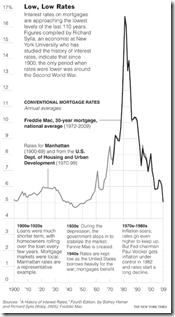
Global Warming Skeptics vs Consensus
10 Dec 2009Point by point.
Copenhagen
In: Environment/weather Interactive Maps Science Source: NYT
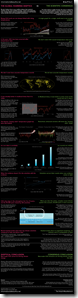
9 Dec 2009Want the summary? The NYT has a nice tool consisting of a series of simple graphics:


Falling Dollar
In: Emerging Markets Finance Global Economy Source: NYT Source: Ritholtz US Economy
8 Dec 2009Who are the winners and losers? (via The Big Picture)


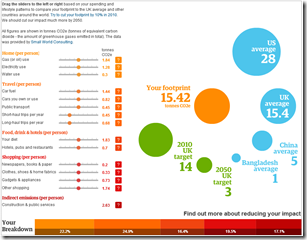
Personal Carbon Calculator
2 Dec 2009Modify your habits from the “average” and see how it impacts your footprint. Click on the ?’s to see what’s behind each category. There’s some discussion of the methodology here.
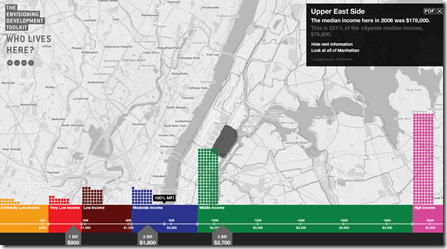
Who Can Afford to Live in NYC?
2 Dec 2009Click on any section of NYC to see the income distribution in that area, and what the average rents are. (via)
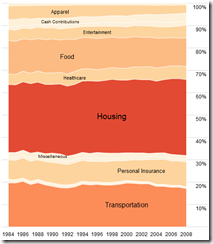
Consumer Spending
2 Dec 2009Click on a category to blow it up. From Flowingdata.
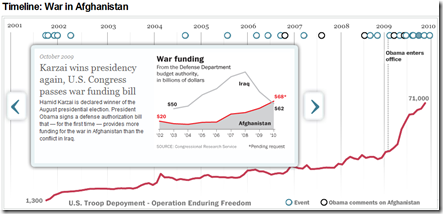
Afghanistan Timeline
2 Dec 2009A nice tool from the Washington Post, includes graphs on troop deployment, war funding, death tolls, and comparisons to other conflicts.
Google Image Searches
1 Dec 2009Several sites have noted Google’s new “Image Swirl” toy (FlowingData for example). It’s fun to play with. An example search for “Santa” is below. I would add that the standard Google image search now has a number of really cool options: you can filter by image size, dominant color, and type of image (photo/clipart/drawing – those these categories aren’t always accurate). Filtering by image size, for example, can help exclude pay-for-image library thumbnails.

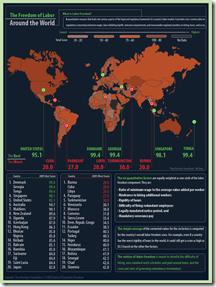
Freedom of Labor
1 Dec 2009I nominate this for “worst color selection 2009”.
USA Today Economic Outlook Index (November edition)
In: Employment Finance Housing Source: USA Today Updated regularly US Economy
1 Dec 2009Updated November 24th. The best part is the lower chart showing the latest data for each of the 11 “leading indicators”.


What is Chart Porn?
An addictive collection of beautiful charts, graphs, maps, and interactive data visualization toys -- on topics from around the world.
Categories
- Bailout (118)
- Chartporn Related (3)
- Commentary (21)
- Culture (669)
- Emerging Markets (66)
- Employment (245)
- Environment/weather (133)
- Finance (298)
- Food (92)
- Global Economy (373)
- Graphic Design (bad) (26)
- Graphic Design (general) (183)
- Graphic Tools (23)
- History (158)
- Housing (162)
- Humor (204)
- Innovative (183)
- Interactive (545)
- Internet/tech (97)
- Maps (578)
- News Media (34)
- Politics (329)
- Reference (97)
- Science (331)
- Source: Economist (101)
- Source: FT (92)
- Source: NYT (147)
- Source: Ritholtz (76)
- Source: USA Today (27)
- Source: Washington Post (90)
- Source: WSJ (135)
- Sports (58)
- Stock Market (74)
- Uncategorized (2)
- Updated regularly (76)
- US Economy (553)
- Video (22)
- Aram Korevaar: This chart is now being used as a projection in which countries such as China see themselves as in a [...]
- David: Welcome back Chart Porn! [...]
- J S: Thanks for the great story. Miss reading this blog. Hope to see you more active again. [...]
- jake: I lived in a DC row house for 6 years, and I'm writing this comment from my tiny 1 bedroom apartment [...]
- ronny pettersen: Hilarious and unfortunately accurate... ;-) [...]